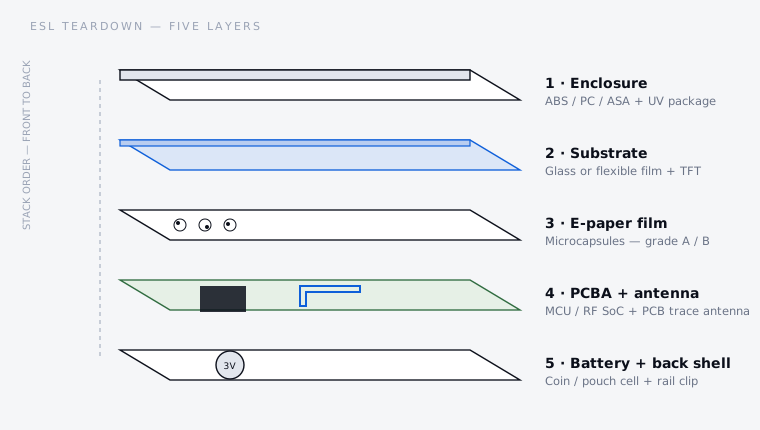
What is actually inside an electronic shelf label?
Electronic shelf labels look like commodity hardware. They are flat, they are small, and every supplier's specification sheet says roughly the same thing: this many inches, this many colours, this many years of battery life, this radio protocol. Buyers compare those numbers, find them nearly identical, and then choose on price.
The problem is that none of the numbers on that sheet describe the things that decide whether a deployment still looks acceptable in year three. Whether the enclosure yellows under store lighting. Whether the panel came from the top of the sorting line or the discount bin. Whether the firmware knows to clear the screen before residue becomes visible. Whether the antenna was tuned inside the closed case or on a bare board. Whether the cell can still deliver a refresh pulse at the end of its life in a chilled aisle.
This article opens each layer in turn and describes what a manufacturer checks, what goes wrong, and what you can ask for as a buyer. We build these products, so the perspective is honest but not neutral — where we describe a test method, it is one you can ask any supplier to run, including us.
Source: PanPanTech ESL production and failure analysis experience, 2026.
Layer 1 — the enclosure, and why labels turn yellow
01The mechanism, briefly
ABS is popular for enclosures because it moulds well, takes texture, and is cheap. Its weakness is the butadiene phase: the carbon-carbon double bonds in that rubber component are exactly what UV energy attacks. Chain scission produces carbonyl groups and conjugated sequences that absorb in the blue end of the visible spectrum. Remove blue from reflected white light and the eye reads the remainder as yellow.
Polycarbonate degrades by a different route — photo-Fries rearrangement and chain scission — but arrives at the same visible outcome, along with surface embrittlement and micro-cracking. Both processes accelerate with heat, which matters more than people expect for a label sitting under a lighting strip or in a west-facing shopfront.
02The three real fixes
03How to verify it instead of trusting the claim
Any supplier can say "UV resistant". The question that separates real answers from marketing is: under which test, for how many hours, and what was the measured colour shift?
Sources: Q-Lab, ASTM G154 overview · Intertek, accelerated weathering by QUV · ASTM E313 yellowness index.
A useful practical demand: ask for a retained sample from an earlier production batch, at least a year old, stored in daylight rather than a drawer. Accelerated tests are correlations, not certainties; a real aged part tells you something a chamber cannot. And specify colour by measured value with a tolerance, not by an approved sample that fades in the file.
Layer 2 — glass or film? What the substrate really changes
01What glass gives you
Flatness first. The e-paper film is laminated to the backplane, and any waviness in the substrate becomes visible non-uniformity in the finished display. Glass is dimensionally stable across temperature and humidity in a way that plastic film is not, which shows up as better lamination yield and more consistent appearance across a production run — the difference between a wall of labels that looks uniform and one that does not.
Then optics. The front glass in a well-made module is optically matched to the laminate, so less light is lost at the interfaces and more of it returns from the white pigment. Since e-paper is entirely reflective, every percent of light lost on the way in and out costs contrast directly — there is no backlight to compensate. This is why two labels with the same nominal panel can look visibly different side by side.
And chemical resistance, which buyers rarely consider until they own thousands of units. Retail labels get wiped — with whatever the cleaning contractor has on the trolley, including alcohol and ammonia-based cleaners. Glass shrugs those off. Plastic front surfaces can craze, haze, or lose their coating after repeated contact, and a hazed label is unreadable in exactly the same way a broken one is.
02What glass costs you
Brittleness, and it is not theoretical. Labels are dropped during installation, knocked by trolleys and pallet jacks, and clipped and unclipped from rails by staff in a hurry. Glass fails from point loads and edge impacts, and it fails suddenly. The mitigation is mechanical design, not material choice: the enclosure must support the panel across its area rather than at the edges, the front bezel must not transmit clip force into the glass, and there must be compliant material between the rigid layers.
This is where cheap labels quietly diverge from good ones. Two products can use the identical panel and show completely different breakage rates in the field purely because of how the enclosure carries the load. It is invisible in a photograph and obvious in a warranty report.
Source: PanPanTech module engineering, 2026. Specific figures vary by panel supplier and lamination process.
Layer 3 — Grade A, Grade B, and panels that should never have shipped
01What the grading actually measures
E-paper panel production is a yield business, like any display process. Not every panel comes off the line perfect, and rather than scrap everything imperfect, manufacturers sort. The sorting criteria are consistent across the industry even when the labels for each bin differ:
02Where downgraded panels end up
Grade B panels are legitimate product. They are sold openly, at a discount, and there are honest applications for them — internal signage, prototypes, price-insensitive uses where a small dot near an edge does not matter. The problem is not their existence. The problem is a finished label that is quoted and sold as though it were built on Grade A material.
Reject or salvage panels are a different matter. They failed specification, and in a well-run supply chain they are destroyed. They do nevertheless appear in extremely low-cost products, and they are the reason a label can be quoted below what the honest bill of materials costs. If a quotation is dramatically under the market and nobody can explain which line item is cheaper, the panel grade is the first place to look.
03How a buyer can actually check
You cannot audit a panel supplier's sorting line. You can inspect what arrives:
Layer 3, continued — ghosting, and why good firmware refreshes every 24 hours
01The physics, in plain terms
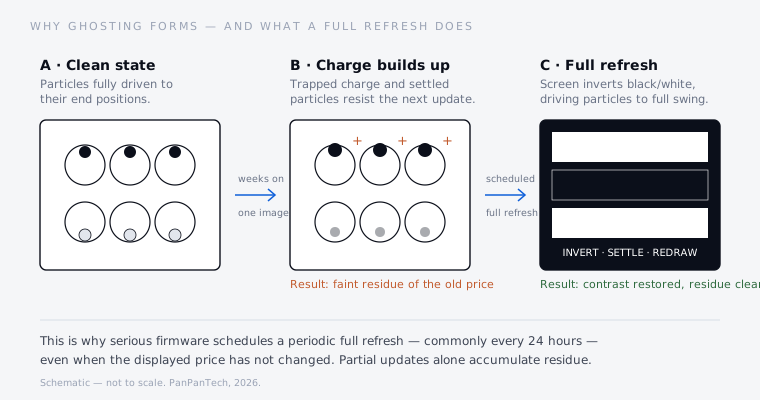
A microcapsule electrophoretic display holds charged white and black pigment particles suspended in a clear fluid inside microcapsules. Apply a field across the capsule and the particles migrate — like charges repel, opposite charges attract — bringing white or black to the viewing surface, where they stay without power. That bistability is the whole appeal of e-paper: a label draws energy only when the price changes.
It is also the source of the problem. Three effects accumulate when an image is held for a long time:
The result is a faint but readable outline of the previous price, sitting under the new one. On a shelf edge that is not merely cosmetic — it is a legibility and, in some jurisdictions, a price-accuracy problem.
02Partial update versus full refresh — the trade every vendor makes
A partial update rewrites only the pixels that changed. It is fast and it does not flash, so the label updates discreetly. A full refresh drives the entire panel through inverted black and white states — visibly flashing — before drawing the new image, forcing every particle through its maximum excursion and resetting the charge state.
Partial updates cost less energy and look better in a demo. Full refreshes cost more energy and look momentarily ugly. A vendor optimising for a specification sheet — "10-year battery life", "silent updates" — is tempted to minimise full refreshes. A vendor optimising for how the deployment looks in year three schedules them anyway.
Sources: waveform behaviour per published e-paper driving literature, e.g. Low-Power Driving Waveform Design for Electrophoretic Electronic Paper (Micromachines, 2024); waveform and OTP files in e-paper displays.
03Temperature makes all of this worse at both ends
E-paper is strongly temperature dependent, because the suspending fluid's viscosity is. Cold fluid means slower particles; a waveform tuned for 25 °C under-drives a panel at 0 °C, so the image comes out grey and smeared or the update fails outright. Hot conditions bring the opposite failure — faster particles, more overshoot, and accelerated charge accumulation, so ghosting builds up faster.
This is why a chilled-aisle or freezer deployment is a genuinely different engineering problem, not merely a colder version of the same one. It needs a panel rated for the range, a temperature sensor, a waveform set selected by measured temperature, and a refresh policy that accounts for both the display and the battery — which, as the next section but one explains, is also struggling at that temperature. Anyone quoting a freezer deployment without asking about temperature compensation has not done it before.
04What this means when you are buying
Firmware quality is the hardest thing to evaluate before purchase, because it looks identical to bad firmware on day one. Four questions that work:
The simple acceptance test: take a sample batch, display one high-contrast image continuously for two to four weeks, then update to a different image using the normal path and inspect for residue. It costs nothing but calendar time, and it separates firmware that manages the panel from firmware that merely writes to it.
Layer 4 — PCBA, silicon, and the antenna nobody tests properly
01What the silicon choice actually changes
An ESL board is usually a low-power MCU with an integrated radio, plus display drive and power management. The specification sheet lists a core and a clock; what matters operationally is different:
02Judging PCBA quality
There is an industry standard for this, and asking about it separates suppliers quickly. IPC-A-610 defines acceptability of electronic assemblies in three classes: Class 1 general electronics, Class 2 dedicated service electronics — the normal commercial and industrial choice, covering roughly 70% of assemblies made globally — and Class 3 high-performance, where failure is not acceptable. Class 2 is the right target for an ESL. The useful question is not "do you follow IPC?" but "which class, and can I see the inspection records?"
Sources: ANSI, IPC-A-610J acceptability of electronic assemblies · IPC-A-610 class comparison. Our own SMT process is described on the manufacturing technology page.
03The antenna — and a correction worth making
ESLs almost always use an antenna etched directly into the PCB copper, because it costs nothing in materials. It is also the component most often left unmeasured, and a widespread piece of shop-floor folklore is that you check it with an oscilloscope. You cannot. An oscilloscope shows a voltage waveform against time: it is the right instrument for power rails, ripple, brown-out margin and timing, and it will tell you nothing about whether an antenna is matched. Antenna matching is a frequency-domain measurement, and the instrument is a vector network analyser, reading return loss and VSWR.
Both instruments belong on the line — they simply answer different questions. Confusing them is how a product ships with an antenna that is 40 MHz off tune and a test report that says everything passed.
Source: PanPanTech RF validation practice, 2026. Specific pass thresholds are set per product and per market.
04Why the enclosure detunes the antenna — and the shelf rail detunes it again
An antenna resonates according to its electrical length, which depends on the dielectric environment around it. Plastic has a higher dielectric constant than air, so closing the enclosure around a bare-board-tuned antenna pulls the resonant frequency down. Tune on a naked PCB and you have tuned a product that does not exist.
Then the label goes onto a steel shelf rail, millimetres behind the antenna. Metal that close couples strongly, shifting resonance again and absorbing radiated energy. A label that measures perfectly on a bench can lose a substantial share of its range once clipped to a real rail — and the failure appears as intermittent update failures in specific store zones, which is exactly the kind of fault that takes weeks to diagnose remotely.
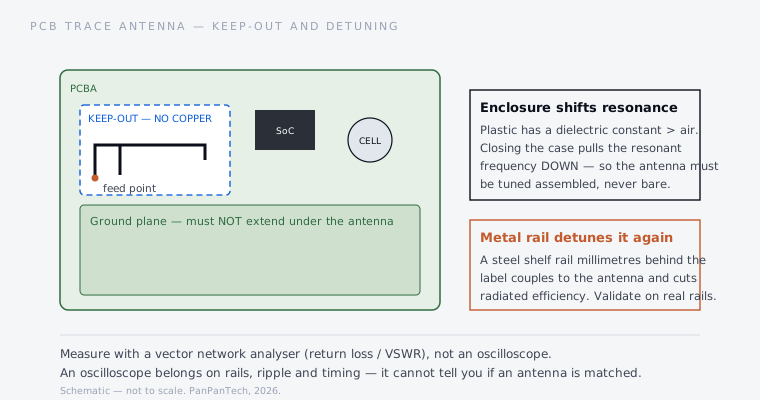
The engineering answers are unglamorous and non-negotiable: keep the ground plane and all copper out of the antenna keep-out zone; keep the battery, its metal clip and the display's metal layers away from the radiating element; tune in the assembled state; and validate on the actual rail type the customer uses, including any metal shelving or freezer-door frames. If a supplier cannot say which rail they validated against, they validated against none.
Layer 5 — the battery, where specification sheets lie most often
01Why pulse behaviour beats capacity
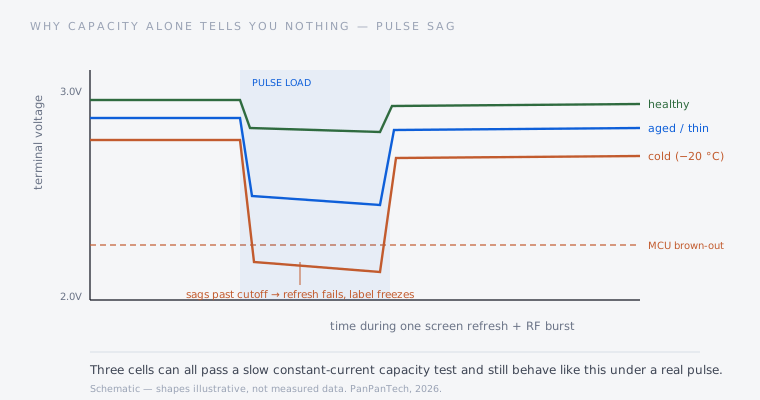
An ESL is asleep almost permanently and then, briefly, is not. A refresh draws current to drive the panel; a radio burst draws current to transmit. Both are short and both are far above the sleep current. The cell's internal resistance turns that current into a voltage drop, and if the resulting terminal voltage falls below the brown-out threshold the MCU resets mid-update. The label freezes showing a half-drawn price, or the update simply fails and the shelf shows yesterday's number.
Real coin cells are specified for exactly this. A Panasonic CR2450, for instance, is rated 620 mAh nominal to a 2.0 V cutoff, with pulse capability characterised in the datasheet — around 9 mA under a defined pulse profile — and an operating range of roughly −30 °C to +85 °C with self-discharge near 1% per year. Those pulse and temperature figures, not the headline capacity, are what the design has to be built around.
Sources: Panasonic CR2450 datasheet · Energizer CR2450 datasheet. Values differ by manufacturer and grade — always work from the datasheet of the cell actually being fitted.
02How overstated capacity actually shows up
Cells with optimistic capacity ratings rarely fail an incoming test, because the usual incoming test is a slow constant-current discharge — the gentlest possible way to measure a cell. Under that test a thin or poor-quality cell can post an acceptable number. Under a real pulse load, especially once it has aged and its internal resistance has risen, it sags far more than a good cell at the same state of charge.
This is why capacity-only acceptance testing produces the classic field pattern: labels that work fine for eighteen months and then start failing updates in clusters, long before the quoted life. The cell has not run out of energy — it has run out of the ability to deliver that energy quickly.
03A discharge test that actually predicts field behaviour
04Cold and freezer deployments
Low temperature raises internal resistance, so voltage sag under pulse gets worse exactly where the display also needs more drive energy. The two effects compound: the panel wants a longer, stronger waveform, and the cell is less able to supply it. This is the mechanism behind labels that work perfectly in the ambient aisle and fail in the chilled section of the same store, and it is why freezer deployments need to be engineered rather than assumed.
If you are specifying for chilled or frozen retail, ask for test data at your actual temperature, on aged cells, on the assembled product. We cover the underlying display technology on the e-paper and ESL technology page, and the manufacturing controls on the manufacturing capability page.
The inspection checklist, in one table
Everything above, condensed into what to specify and verify at each stage. This is the practical output of the teardown — a buyer working through this list is asking better questions than most tenders contain.
Source: PanPanTech ESL production and OEM programme practice, 2026. Thresholds are set per product, market and deployment environment.
None of this is exotic. It is ordinary manufacturing discipline applied to a product that most of the market treats as a commodity — which is exactly why the differences between two visually identical labels only surface after they are installed by the thousand.